 Add to Chrome
 Add to Firefox
 Safari
What it does
One field, and the tabs you meant
-
A domain or a keyword
Whatever you type is looked for anywhere in each tab's address, in every window, capitals or not.
facebook.comcloses Facebook;docscloses every doc. Turn on titles, the text on the page, or regular expressions if you need them. -
Counted before it closes
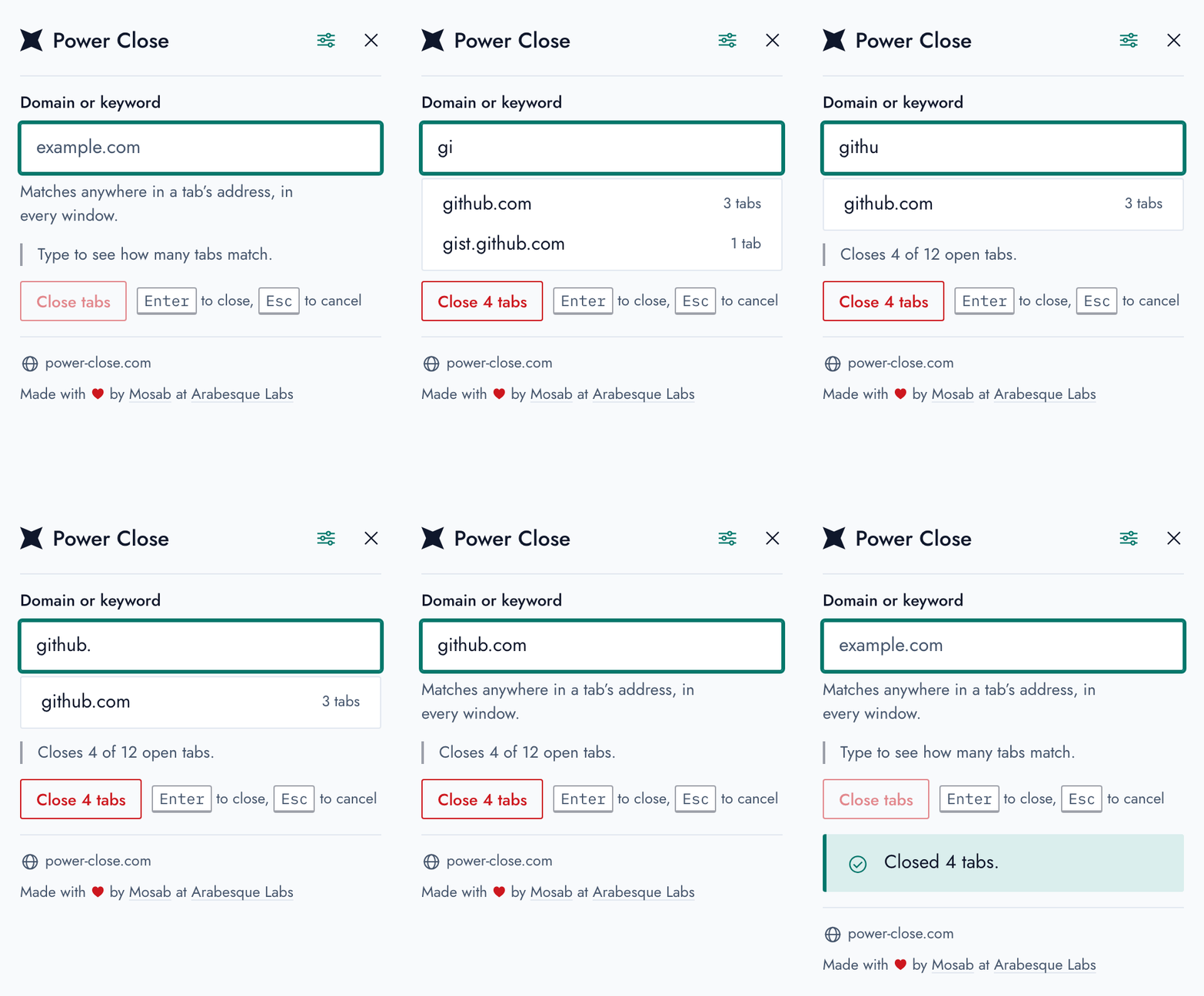
As you type, the popup says how many of your open tabs will close, and the button says it again. When nothing matches, nothing can close.
-
From the page you're on
Right-click anywhere on a page, an image included, and choose “Close all tabs from this domain”: every tab on that exact domain goes, or its subdomains too, if you'd rather.
-
Made for the keyboard
Alt Shift P opens it, ready to type. Press Enter, and they're gone; Esc leaves everything as it was.
-
Suggests as you type
The domains of your open tabs that start with what you've typed, and how many tabs each has, under the field. ↓ and Enter take one.
-
Set up your way
Keep pinned tabs open, choose what's matched and where the right-click option shows. Each setting applies at once, and follows you between your devices.
-
In any script
Domains and addresses in Arabic, Chinese or any other script match as you read them: type مثال.مصر and that site's tabs are found.
-
Light or dark
It follows your browser's setting, and it's built on the Arabesque Labs design system, readable and usable by everyone.
-
Nothing leaves your browser
No account and no tracking: it reads your tabs' addresses to match them, and that's all. Free and open source, under the GPL.
Screenshots
It says what will happen, then what did


Questions
Before you install it
Which tabs will it close?
Every tab, in every window, whose address has what you typed
anywhere in it, capitals or not. So github closes gist.github.com
too; type the whole domain to close just one site. Pinned tabs that match close as well,
unless you turn that off in the settings, where you can also have it match tabs' titles or
the text on their pages.
I closed too many. Can I get them back?
Your browser keeps them: Reopen Closed Tab (Ctrl Shift T, or ⌘ Shift T on a Mac) brings them back, one at a time, and they're all in your history.
Why does it ask to read my tabs?
To match what you type against their addresses, and to count and close them. It doesn't send them, or anything else, anywhere: the extension has no network code at all, as its source shows.
If you turn on matching the text on the page, it asks your browser for access to read pages too. It reads them only when you open the popup, and gives the access back when you turn the setting off.
Is it coming to Safari?
Yes: a Safari version is on its way. Until then, Power Close is on Chrome, Firefox and Firefox for Android.
Who makes it?
Mosab Ibrahim wrote it for Firefox in 2014, Mina Asham ported it to Chrome, and it's now made at Arabesque Labs. Bug reports and contributions are welcome on GitHub.
Fewer tabs, in one keystroke.
Free, for Chrome and Firefox. Safari is coming soon.
Power Close is free and open source. If it saves you time,